How to Verify SASSA Status on GovChat?

Do you want to perform a SASSA status check but cannot access the official SRD portal? There’s no need to worry.
You can still check your SASSA grant application status online even when the SRD portal is unavailable.
You can use the GovChat platform to check your SASSA status online at any time. All you need is a mobile phone with internet access and WhatsApp.
This guide explains the complete process step by step. It is especially useful for applicants who struggle to access the official SASSA website due to downtime or technical issues.
Get Your SASSA Grant Application Status Updates on GovChat
GovChat has been an official government-supported communication platform since 2018. It allows South Africans to access services such as SASSA status checks, grant applications, and service delivery reporting through digital channels.
You can use GovChat to check your SRD R370 grant status without logging into the SRD portal.
- Visit the official GovChat website at www.govchat.org.
- Create an account using your email address and mobile number.
- Link your account to WhatsApp.
- Use WhatsApp to communicate with GovChat.
- Start a chat using the official GovChat WhatsApp number 082 046 8553.
- Follow the prompts to request your SASSA grant status.
What Is GovChat?
GovChat is a digital citizen engagement platform launched in 2018 to improve communication between South African citizens and government departments. It was co-founded by Eldrid Jordaan, Goitse Konopi, and Motty Sacks.
The platform allows users to access government services, report service delivery issues, rate public facilities, and apply for selected services such as SASSA grants. GovChat integrates directly with WhatsApp, making it accessible to millions of users.
As of 2025, GovChat serves millions of South Africans and is officially used to support services from departments such as SASSA and the Department of Social Development.
How to Use GovChat
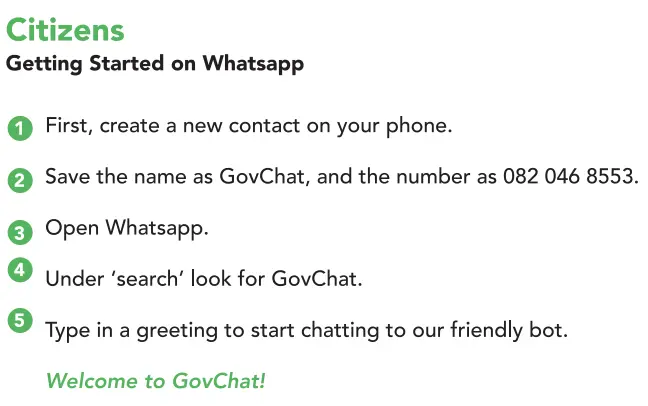
GovChat no longer requires a standalone mobile app. Instead, services are accessed directly through WhatsApp, which makes it easier to use without downloading additional software.
Step 1: Save the GovChat WhatsApp Number
- Open your phone’s contacts.
- Save 082 046 8553 as “GovChat”.
Step 2: Open WhatsApp
- Open WhatsApp on your phone.
- Start a new chat with “GovChat”.
Step 3: Start the Conversation
Send a message such as “Hi” to begin. Follow the automated prompts to access services such as:
- SASSA status check
- Submitting service delivery feedback
- Logging government service requests
- Applying for SASSA grants
Key Benefits of Using GovChat on WhatsApp
- No app download required
- Accessible through WhatsApp
- Works even when SASSA portals are busy or offline
How to Apply for SASSA Grants Using GovChat
GovChat also allows eligible applicants to apply for certain SASSA grants through WhatsApp.
Step 1: Start a Chat with GovChat
- Save the GovChat WhatsApp number.
- Open WhatsApp and start a chat.
- Send a greeting message.
Step 2: Request a SASSA Grant Application
- Type “SASSA Grant Application”.
- Select the grant type, such as:
- SRD R370 Grant
- Disability Grant
- Other available grants
Step 3: Provide Personal Details
- Full name
- Surname
- Email address
- Mobile phone number
Step 4: Submit Required Documents
Depending on the grant, you may need to upload supporting documents such as:
- Medical assessment reports (for Disability Grant)
- Bank statements in PDF format
Ensure all documents are clear and accurate.
Step 5: Wait for Confirmation
- You will receive confirmation via WhatsApp.
- Status updates will also be sent through GovChat.
F.A.Q
Can I download the GovChat app?
No. GovChat services are now accessed through WhatsApp and the official GovChat website.
How do I log in to GovChat?
You can log in at www.govchat.org using your registered email address and password.
How do I check my SASSA SRD status on GovChat?
Start a WhatsApp chat with GovChat and follow the prompts. You will need your South African ID number and mobile number.
What is the official GovChat WhatsApp number?
The official GovChat WhatsApp number is 082 046 8553.