
How to Verify SRD Grant Application Approval on WhatsApp?

SRD R370 grant application status verification is essential for all applicants. If you have submitted your SASSA SRD application, you should regularly verify your application status using the SASSA status check page.
However, this guide is specifically for applicants who want to understand how to check the status of the SRD grant application on WhatsApp, especially when access to the official SRD portal is limited or unavailable.
In this post, I explain how you can check your SASSA SRD grant status using WhatsApp-based services. This step-by-step guide is designed to help you stay updated without confusion.
How to Check SASSA Status on WhatsApp?
Checking your SRD R370 grant application status via WhatsApp is simple when you use an officially supported channel. This method is particularly useful during periods of high traffic or system maintenance on the SRD portal.
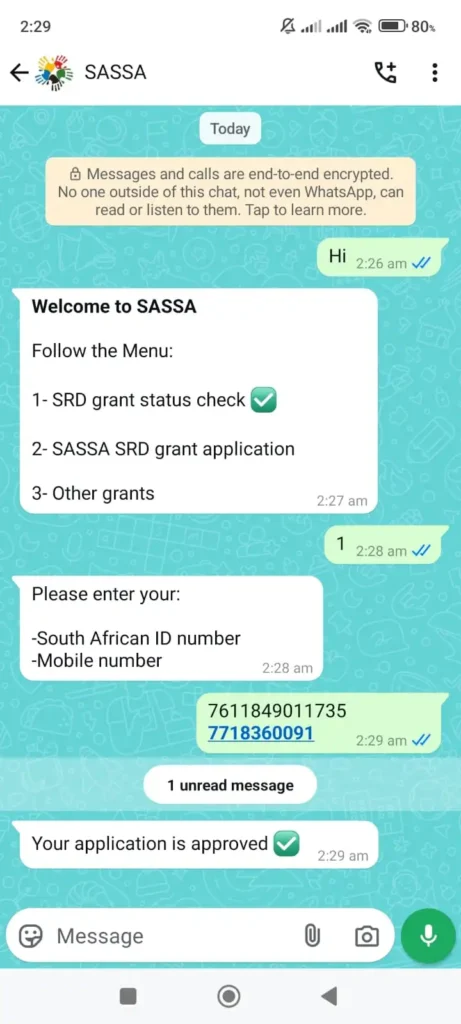
Step 1: Save the Official GovChat WhatsApp Number (082 046 8553)
To begin, save the GovChat WhatsApp number (082 046 8553) on your phone. GovChat is an official government-supported platform used to provide access to SASSA services, including SRD status checks.
Step 2: Prepare Your Required Details
Before starting the chat, make sure you have the following information ready:
- Your South African ID number
- The mobile phone number used during your SRD application
- Your SRD grant application reference (if available)
Step 3: Start the WhatsApp Conversation
Open WhatsApp and start a new chat with GovChat. Send a greeting such as “Hi” or “Hello” to begin the automated conversation.
Follow the on-screen prompts carefully. When asked, provide your ID number and phone number to retrieve your SRD grant application status.
Step 4: Receive Your Application Status
After submitting your details, you will receive an automated response displaying your current SRD application status. This may show as approved, pending, declined, or failed due to verification issues.
How to Check SASSA Appeal Status on WhatsApp in 2025
Applicants who have lodged an appeal through the Independent Tribunal for Social Assistance Appeals (ITSAA) can also use WhatsApp services to track their appeal status.
Start a chat with GovChat on WhatsApp and follow the prompts to request your SRD appeal status. You may be required to provide your appeal reference number or ID details.
How to Check SASSA SRD Grant Balance on WhatsApp
WhatsApp services do not directly display your SASSA payment balance. However, you can confirm whether your grant has been paid by checking your linked bank account or payment method.
If your SRD grant is paid into a bank account, you can use your bank’s official WhatsApp service to view your balance. If you use a cash or alternative payment method, payment notifications will be reflected in your SASSA status updates.
Understanding SASSA Status Messages on WhatsApp
When checking your SASSA SRD status via WhatsApp, you may receive one of the following messages:
Status Approved
Your application has been approved, and payment will be processed according to SASSA’s payment schedule.
Status Pending
Your application is still under review for the selected month.
Status Declined
Your application was declined for the month. A reason may be provided, and you may appeal if eligible.
Status Failed Due to Identity Verification
Your details could not be matched with Department of Home Affairs records. You may need to correct your information before rechecking.
Frequently Asked Questions
Can I check my SRD status on WhatsApp?
Yes. You can check your SRD status using WhatsApp through official platforms such as GovChat.
Is checking SASSA status on WhatsApp free?
The service itself is free, but you must have mobile data to use WhatsApp.
Can I submit an appeal on WhatsApp?
WhatsApp services may guide you, but official appeals must still be submitted through the ITSAA appeal platform.


